Device Home Page
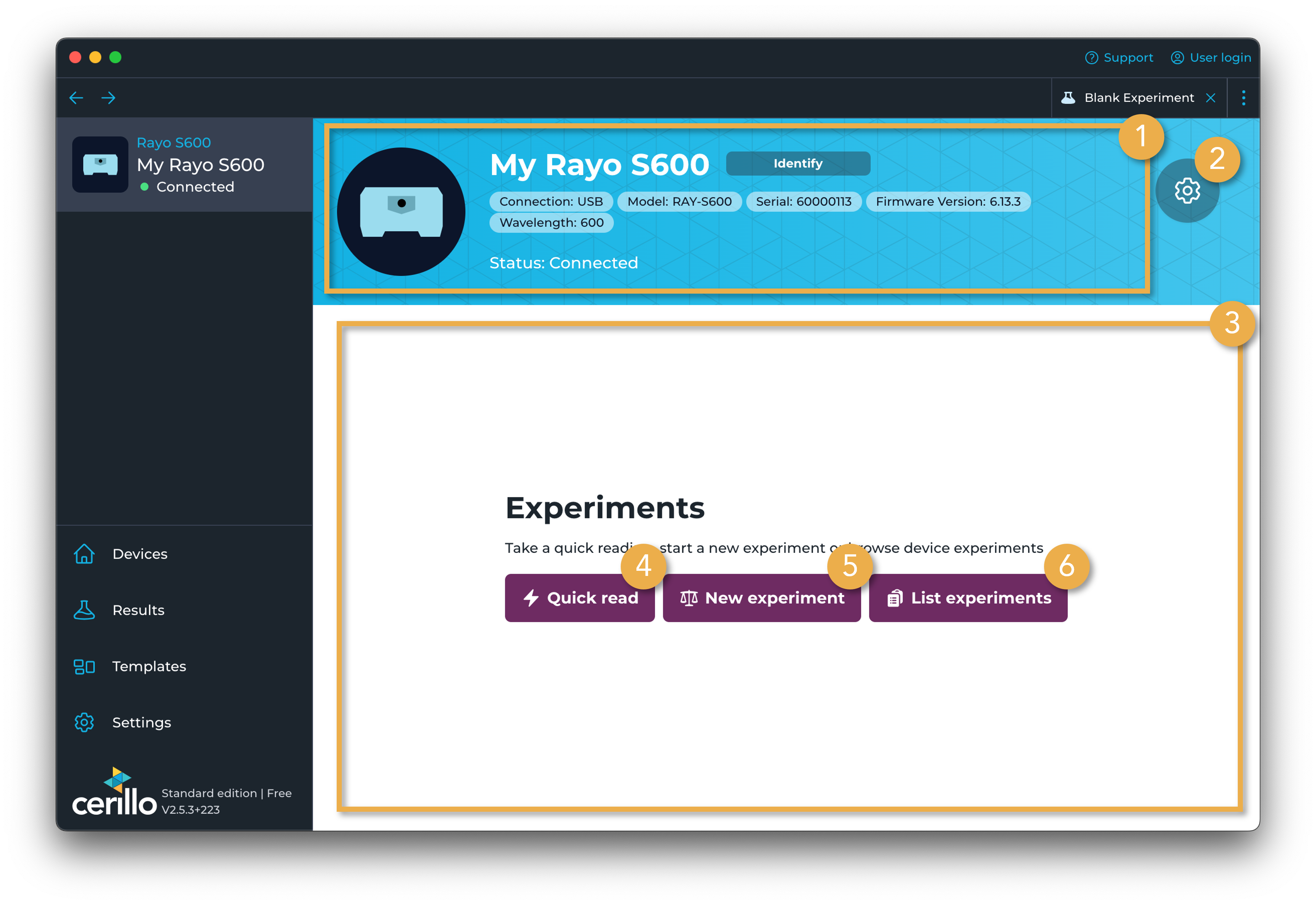
Number |
Element |
Description |
|---|---|---|
1 |
Device Info Panel |
Contains device identifying information and status information. Contains an Identify button that will blink the status LED of a device to identify it from afar. Automated devices will have an Open device lid or Close device lid button in this panel, depending on the current lid position. The button reads Home device lid if the lid position is unknown, and Motor moving… while the lid is moving. If the Serial monitor feature is turned on, a Serial monitor button will be present here. See Debugging for more information. |
2 |
Device Settings Button |
Brings up device settings in the Device Control Panel area of the application. |
3 |
Device Control Panel |
Contains device controls. Content changes when Device Settings, New Experiment, or List Experiments buttons are clicked. Default display shows general controls. |
4 |
Quick Read Button |
Opens Endpoint Experiment Wizard to walk user through endpoint experiment calibration and reading. Endpoint readings must be enabled on the device through Device Settings for this button to appear. |
5 |
New Experiment Button |
Opens Experiment Setup in the Device Control Panel |
6 |
List Experiments Button |
Opens Device Experiment List in Device Control Panel. |