Device Experiment List
Navigate to this panel by clicking the List Experiments button in the Device Home Page. Click an experiment in the row to open up its data in an Experimental Page
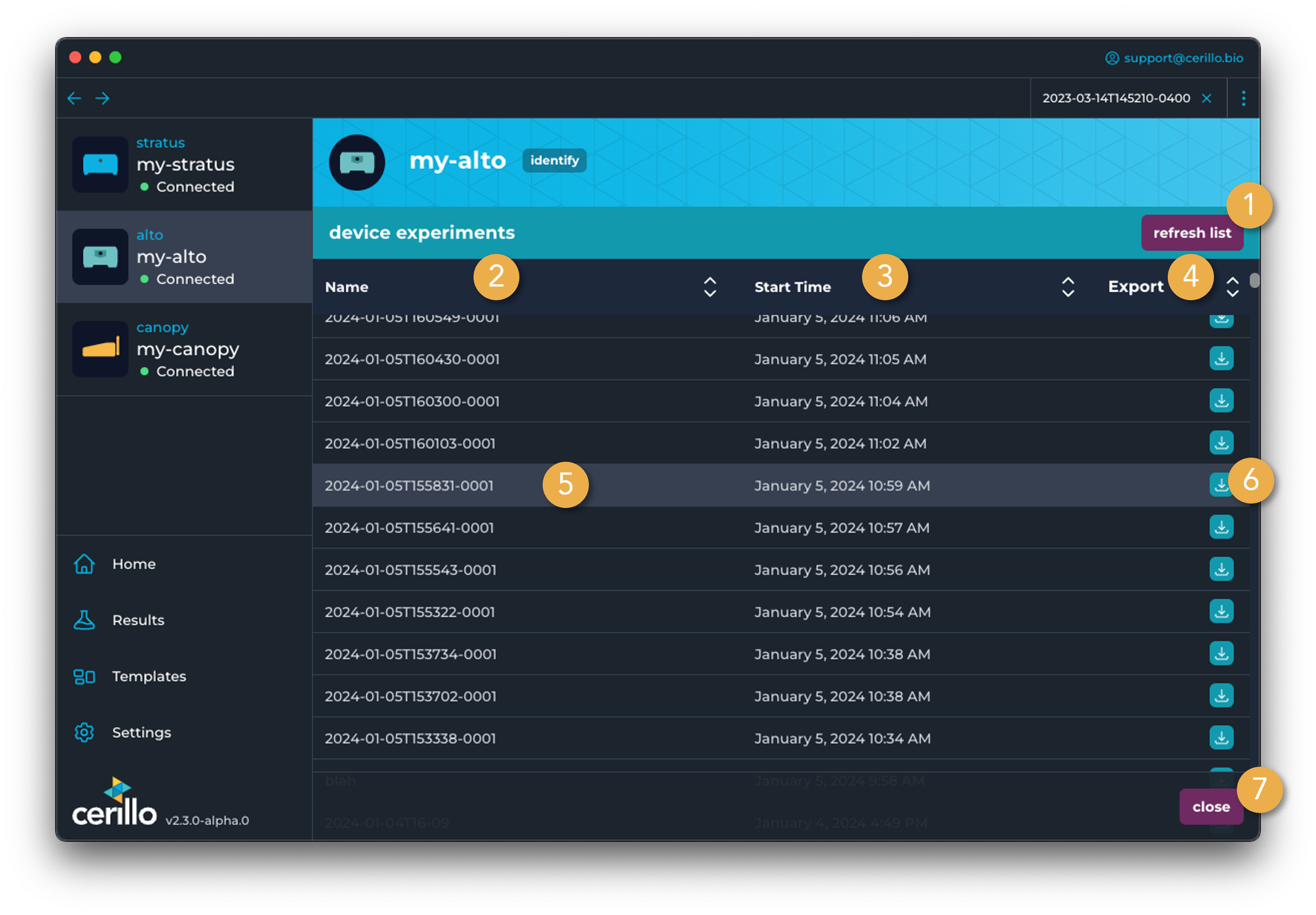
Number |
Element |
Description |
|---|---|---|
1 |
Refresh List |
Refresh list of experiments. This will access experiments from all connected devices. |
2 |
Name Column |
Click to sort experiment list by the experiment name. |
3 |
Start Time Column |
Click to sort experiment list by the start time of the experiment. |
4 |
Export Column |
Sort by experiments that are exportable |
5 |
Experiment Row |
Click an experiment row to load that experiment into Labrador, which will add it to the Experiment Tab Bar and navigate to that tab. Hovering over a row for a cached experiment will also show a preview of the graph results for the |
6 |
Export Button |
Export the experiment in this row. This button is only available for experiments on a connected device OR for experiments that have been viewed previously and thus have their data cached. |
7 |
Close Button |
Closes out of the experiment list. Navigates to the device home page |
Tip
If experiments on the device are not appearing in the list, scroll to the bottom of the list and click the button to search for older experiments recorded with firmware less than v6.0.0. Older experiments can be exported with the Export Column the same as regular experiments, but cannot be viewed.